Everyone eventually has to deal with a little belly fat — even those of us who naturally had flat stomachs in our younger years. But too much of this type of tissue can have a negative effect on your health. But how much is too much? That depends on several factors, but experts agree that if you're a woman with a waist circumference of 35 inches or more or a man with a waist measuring 40 inches or more, you're vulnerable to the dangers of belly fat.
It's not just about the way your jeans fit. Excess abdominal fat increases your odds of developing some serious diseases, including diabetes, dementia, heart disease and cancer. Want to tip the scales toward better health and a smaller waistline? Try these healthy techniques to help banish belly fat and get fitter.
Have you heard the saying "Great abs are made in the kitchen?" It's true — what you eat really matters. And that certainly applies to taking a healthy approach to losing belly fat. For starters, it helps to know what to eat — and what to avoid. Skip high-sugar foods and drinks. Take a hard pass on anything with high fructose corn syrup, chuck trans-fats from your pantry and limit your intake of processed white-flour breads and pastas. All of these foods can contribute to gaining belly fat.
Photo Courtesy: M_a_y_a/Getty Images
Instead, load up on fiber-rich foods; these can help you feel full longer by stabilizing hunger hormones so you don't want to eat as often. Whole grains, legumes, vegetables and fruits are all good sources of soluble fiber, your belly fat-fighting sidekick. High-protein foods, including fish, chicken, eggs and dairy, have also been shown to reduce belly fat gain. They can help keep you feeling full and boost your metabolism, too. Good-for-you fats like olive oil and avocados also contribute to satiety, meaning you'll stay full and, as a result, eat less.
Get Moving to Get Losing
There's no single exercise that can blast away belly fat. Experts agree that spot reduction, such as doing hundreds of daily situps and crunches to slim your waist, isn't the best or healthiest way to get the job done. You'll likely end up with rock-hard abs under a layer of pudge. Instead, look for workouts that combine strength training, cardio and core work to reduce body fat and whittle your middle. As an added bonus, regular exercise can lower your blood sugar levels, reduce inflammation and improve the metabolism issues associated with carrying excess belly fat.
Photo Courtesy: Diego Lezama/Getty Images
Even if you're new to fitness, you can start where you are. Go for a walk, hop on a stationary bike — just get moving. Running, walking, swimming and bicycling are all good ways to get your heart pumping. Start building fitness into your daily routine to make a habit of it. For example, you can start walking on your lunch breaks at work, or hop on the treadmill while your favorite TV show is airing. The less you have to go out of your way to get workouts in initially, the easier it'll be for you to make fitness a lifelong health-boosting habit and reach a healthy weight.
Lose the Lifestyle Limitations for Lasting Losses
Diet and exercise are important, but they're not the only things you need to address to shed stubborn belly fat. Reducing your alcohol intake, for example, is one beneficial adjustment you can make. Excessive alcohol consumption not only makes it easier to pack on pounds (it's all empty calories), but it also can damage your liver, increase your odds of developing health problems and increase inflammation. Alcohol has also been linked to suppressing your body's natural fat-burning abilities.
Photo Courtesy: PeopleImages/Getty Images
Other healthy changes to make include drinking more water every day, which can boost your metabolism and help flush toxins from your body. Reducing your stress levels is another key step. Stress is linked to higher levels of the hormone cortisol, which can cause your body to hold onto fat in your abdomen.
Lastly, make sure you prioritize getting a good night's sleep — every night. In one recent study from the journal SLEEP, researchers found a clear link between the amount of sleep people get every night and the amount of weight they gain, particularly around their midsections. Short sleepers, who sleep fewer than five hours every night on average, are at the highest risk of gaining abdominal fat. So rest up to boost your chances of maintaining a healthy weight.
Watch brands are developing presentation boxes of recycled or green materials, a sign of their concern for sustainability.
From Tiffany's blue box to Cartier's red one, product packaging can produce powerful brand associations and create a visual appeal that awakens desire for the objects inside.
When it comes to high-end watches, oversize boxes in glossy exotic woods or covered in leather are industry mainstays, less for their practical utility than to help build a sense of luxury and reinforce the perceived quality of the products they contain. In the resale market, they impart an added sense of authenticity for buyers, who assign more value to a watch that is sold with its original box and papers.
Now, with consumer attitudes in favor of eco-friendly products, some brands are thinking "outside the box" and making sustainability a central component of a business strategy in which the packaging itself is a selling point.
"Big glossy wooden boxes are so dated," said Jeremia Adatte, a designer and administrator at Adatte Design, an industrial design studio in Lausanne, Switzerland. "Who wants to see trees cut down to make a watch box?"
Adatte, a family-owned business founded by Mr. Adatte's father, Georges, has been producing packaging for clients in different industries since 1991. "Packaging is more important today than ever," Mr. Adatte said. "Just look how popular unboxing videos are on social media."
With 20 graphic artists and designers, the company designs and produces packaging, display accessories and corporate gifts made from recycled and nonrecycled material. A partner factory in Shanghai handles nearly all of Adatte's production, with some sourcing and finishing done locally in Switzerland or in Italy, France, Germany, Spain and the Czech Republic.
"Coming up with an original idea takes years of research and development, whether it is a new concept or a design to meet specs for a client," Mr. Adatte said. "Our approach is innovation-focused, both in design and in sourcing new materials."
Adatte's website lists a number of watch brand clients, including Breitling, TAG Heuer and MB&F MAD Gallery, and the company said it had designed a variety of innovative packages, objects and display options for them. However, Mr. Adatte said he cannot be specific about projects, and most brands, when asked, would not even identify their suppliers.
"When you are creating a box with 'poor' materials, like cardboard or upcycled plastics, you need a strong design and that is attractive enough for an expensive watch," Mr. Adatte said.
But designing sustainable packaging is not just about image. It can have a financial impact on the brand's bottom line, especially when the solution is scalable.
"Today, brands look for innovative packaging because their customers care about waste," Mr. Adatte said. "But beyond improving their image, lightweight, easily transportable boxes save brands money."
Breitling's chief marketing officer, Tim Sayler, said that reducing the company's carbon footprint and its shipping costs were winning arguments in its decision to adopt new packaging. Last month it introduced a foldable watch box made entirely of recycled PET, or polyethylene terephthalate, a plastic from bottles.
"Transportation is always an issue in sustainability," Mr. Sayler said. "Our new box ships flat so it takes less space."
A functional piece, its side and front wings fold up and fasten with snaps to create a 3-D shape. An inside pocket was designed to store the digital certificate of ownership that the brand recently introduced for its watches. A travel pouch, also made of recycled PET, is included.
The box may be recycled again, according to Breitling, if it is taken to a facility that handles recycled PET.
"This box," Mr. Sayler said, "was designed by our team of in-house designers who work on everything from watches to collaterals to boutiques, with external input from partners who advised us on design and material sourcing." He would not identify the partners, but said the design process took 18 months.
Next year Breitling expects to use around 200,000 of the boxes, made by a German packaging supplier in China, for new watches. And, in an effort to reduce shipments, the boxes will be dispatched directly to boutiques or subsidiary markets rather than to Breitling's Swiss headquarters, Mr. Sayler said.
Breitling is not the first brand to take this focus. In 2018, IWC Schaffhausen designed boxes that "contain 90 percent less plastic than previously, and 80 percent of the plastic remaining is recycled," Franziska Gsell, IWC's chief marketing officer and chairwoman of its Sustainability Committee, wrote in an email. The weight and volume of the boxes also were reduced by 30 percent.
Why not abandon plastic altogether? The Paris-based watch brand Nepto uses only recycled cardboard and paper for its boxes, according to its founder, Vincent Ifrah, 33, who holds a degree in materials engineering. Nepto makes about 1,000 watches a year, with a starting price of 189.90 euros ($224).
"Our boxes are 100 percent recycled and recyclable, and they look good, so you will not want to throw them away," Mr. Ifrah said.
"There is really no reason to use plastic to make watch boxes today since we get the same quality using cardboard," he said. "Ours are made in France at a very low cost, proof that it is perfectly doable."
Recycled cardboard also is the packaging material most widely used by Oris, a Swiss watch brand. And, according to Rolf Studer, its co-chief executive, the business will become CO2-neutral next year by managing travel, reducing energy usage and several other steps.
"When we started talking about sustainability 10 years ago, everyone would yawn," Mr. Studer said from the factory in Hölstein, Switzerland. "Now everyone is talking about it."
In partnership with Pacific Garbage Screening, a nonprofit association building a floating platform designed to capture ocean plastics, Oris last year released the Clean Ocean Limited Edition diver watch in a series of 2,000 (priced at 2,200 Swiss francs, the equivalent of $2,400). The watch came with a case back decorated with a medallion of recycled PET and was sold in a box made partly of marine algae and covered with recycled paper originally used to filter algae in Venice's Grand Canal. A travel pouch of recycled cotton is to be added next year.
"We want to bring attention to the fact that trash can have a second life even in a luxury product," Mr. Studer said.
"Everything about owning luxury is changing," he said. "Investing in luxury product only makes sense today when it is in something you love and will keep forever."
A simple business plan is the secret to starting a business successfully.
The easiest way to simplify the work of writing a business plan is to start with a new business plan template.
You're already investing time and energy in planning your small business—there's no need to reinvent the wheel when it comes to formatting your plan. Instead, to help build a complete and effective plan, lean on time-tested structures created by entrepreneurs and startups who have come before you.
Business plans often are used to secure funding, but plenty of businesses find writing a plan valuable, even if they never work with an investor. That's why we put together a free business plan template to help you get started.
Free: Business Plan Template
Business planning is often used to secure funding, but plenty of business owners find writing a plan valuable, even if they never work with an investor. That's why we put together a free business plan template to help you get started.
Get the business plan template delivered right to your inbox.
Almost there: please enter your email below to gain instant access.
We'll also send you updates on new educational guides and success stories from the Shopify newsletter. We hate SPAM and promise to keep your email address safe.
Why write a business plan at all?
It's tempting to dive right into execution when you're excited about a new business or side project, but taking the time to use a small business plan template to get your thoughts on paper allows you to do a number of beneficial things:
Evaluate your business ideas. Whether you've got one business idea or many, a business plan can make an idea more tangible, helping you see if it's truly viable.
Plan for your next phase. Whether your goal is to start a new business or scale an existing business to the next level, a business plan can help you understand what needs to happen and identify gaps to address.
Clarify marketing strategy, goals, and tactics. Writing a business plan can show you the actionable next steps to take on a big, abstract idea. It can also help you narrow your strategy and identify clear-cut tactics that will support it.
Scope the necessary work. Without a concrete plan, cost overruns and delays are all but certain. A business plan can help you see the full scope of work to be done and adjust your investment of time and money accordingly.
Hire and build partnerships. When you need buy-in from potential employees and partners, especially in the early stages of your business, a clearly written business plan is one of the best tools at your disposal. A business plan provides a refined look at your goals for the business, letting partners judge for themselves whether or not they agree with your vision.
Secure funds. Securing funding for your business, whether from venture capital or a bank, is one of the most common reasons to create a business plan.
Why use a business plan template?
A business plan can be as informal or formal as your situation calls for, but even if you're a fan of the back-of-the-napkin approach to planning, there are some key benefits to starting your plan from an existing business idea template.
No blank-page paralysis. A blank page can be intimidating to even the most seasoned writers. Using an established framework and guidelines can help you get past the inertia of starting your business plan, and it allows you to skip the work of building an outline from scratch. You can always adjust a template to suit your needs.
Guidance on what to include in each section. If you've never sat through a business class, you might never have created a SWOT analysis or a balance sheet before. New business plan templates that offer guidance—in plain language—about how to fill in each section can help you navigate sometimes-daunting business jargon and create a complete and effective plan.
Knowing you've considered every section. In some cases, you may not need to complete every section of a business plan idea template, but its initial structure shows you you're choosing to omit a section as opposed to forgetting to include it in the first place.
Who should use this business plan template for new business
This free business plan proposal is designed to ensure you're thinking through all of the important facets of starting a new business. It's intended to help new entrepreneurs and small business owners consider the full scope of running a business and identify functional areas they may not have considered or where they may need to level up their skills as they grow.
That said, it may not include the specific details or structure preferred by a potential investor or lender. If your goal with a detailed business plan template is to secure funding, check with your target organizations—typically banks or investors—to see if they have an outline you can follow to maximize your chances of success.
Free: Business Plan Template
Business planning is often used to secure funding, but plenty of business owners find writing a plan valuable, even if they never work with an investor. That's why we put together a free business plan template to help you get started.
Get the business plan template delivered right to your inbox.
Almost there: please enter your email below to gain instant access.
We'll also send you updates on new educational guides and success stories from the Shopify newsletter. We hate SPAM and promise to keep your email address safe.
Sections of your business plan template
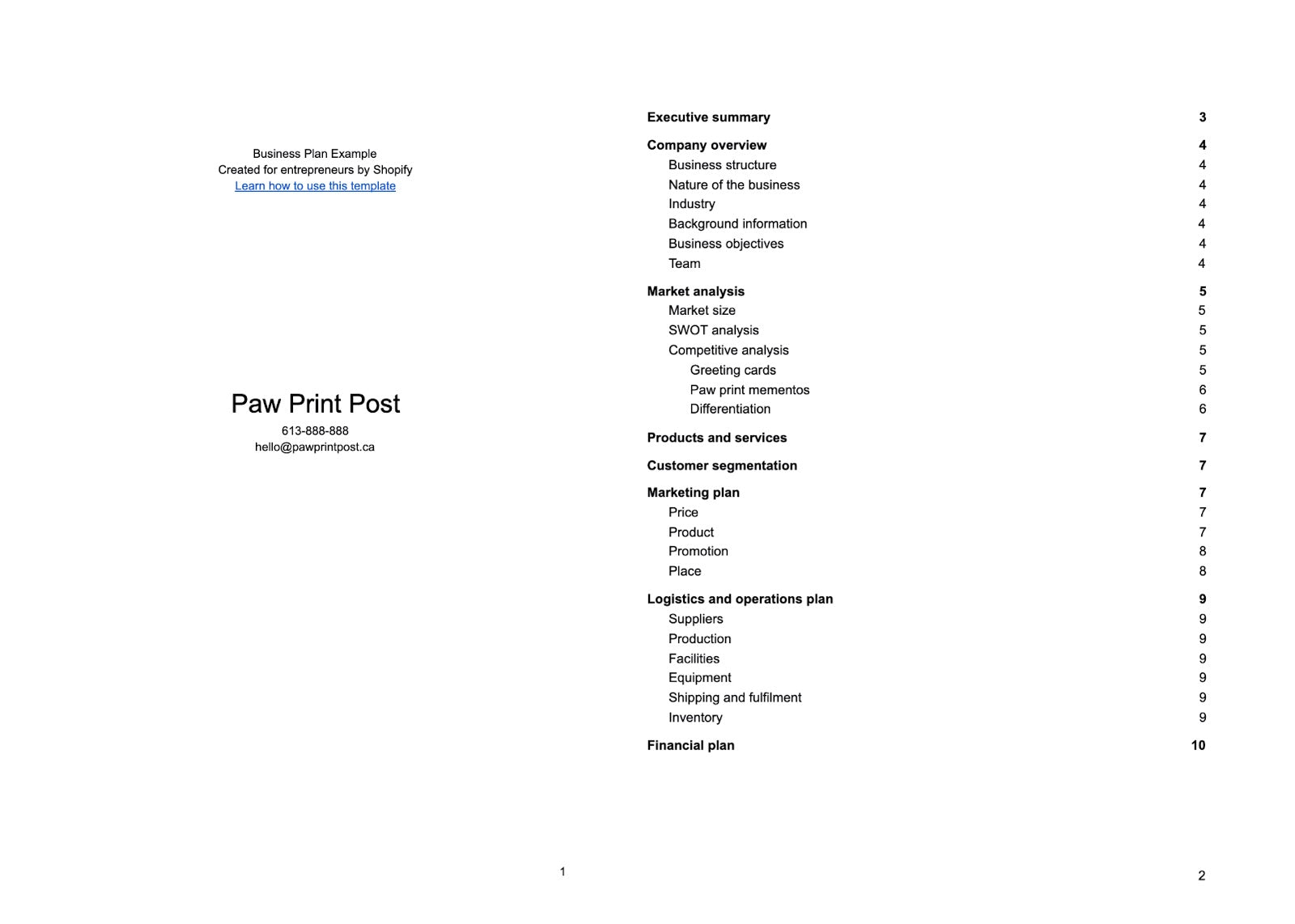
This free business plan template includes the following sections:
Executive summary. A one-page summary of your whole plan, typically written after the rest of the plan is completed.
Company description. An overview can include many potential sub-sections, from the basics (your type of business model) to the meaningful (your business' vision and mission statement).
Market analysis. Everything from estimated market size to your target markets. It'll also include a competitive analysis of your industry to address competitors strengths and weaknesses.
Products and services. What you sell and the most important features of your products or services. It'll also include any plans for intellectual property, like patent filings or copyright. If you do market research for your products, it'll show up in this section of your business plan.
Marketing plan. How you intend to get the word out about your business, and what strategic decisions you've made about things like your pricing strategy.
Logistics and operations plan. Everything that needs to happen to turn your raw materials into products and get them into the hands of your customers.
Financial plan. It's important to include a look at your financial projections. This section includes templates for three key financial statements: an income statement, a balance sheet, and a cash-flow statement.
In our small business plan template, each section includes an overview of the most important information to cover and guidelines on how to approach writing and researching each one.
How to write a creative business plan using this free template
There are some high-level strategic guidelines beyond the advice included in this free business plan proposal that can help you write an effective, complete plan while minimizing busywork. Keep the following in mind when using a business idea template:
Know your audience. If you're using a new business plan template for yourself in order to get clarity on your ideas and your industry as a whole, you may not need to include the same level of detail or polish you would with a business plan you want to send to potential investors. Knowing who will read your plan will help you decide how much time to spend on it.
Know your goals. Understanding the goals of your plan can help you set the right scope. If your goal is to use the plan as a roadmap for growth, you may invest more time in it than if your goal is to understand the competitive landscape of a new industry.
Take it step by step. Writing a 10- to 15-page document from a business plan idea template can feel daunting, so try to tackle one section at a time. Select a couple of sections you feel most confident writing and start there—you can work on the next few sections once those are complete. Jot down bullet-point notes in each section before you start writing to organize your thoughts and streamline the writing process.
Once you've done the strategic work, it's time to put it into action and write your plan. Download the business plan template for new business, and review our guide on writing a business plan for additional information.
A professional business plan example to inspire you
We've filled out a sample business plan as a companion to our template, featuring a fictional ecommerce business. We've noted where—and how—an entrepreneur could add more details to expand on their plans, depending on their goals.
Our fictional business creates custom greeting cards with your pet's paw prints on them, and the founder of the business is writing a plan to help understand the market, as well as the logistics and costs involved, to give themselves the best chance of success before they launch.
The sample is set up to help you get a sense of each section of the small business plan template and understand how they apply to the planning and evaluation stages of a business plan. If you're looking for funding, this example won't be a complete or formal look at a business idea template, but it will give you a great place to start and notes about where to expand.
Before you write your own, read through the following business plan example. You can download a copy in Microsoft Word or Google Docs and use it to inspire your own planning.
Download the business plan example (.doc)
Maximizing your business planning efforts
Although even the best-crafted plan may not survive its first contact with reality, the act of planning is still invaluable for any business owner.
To make sure your efforts are focused on the highest-value parts of your own business planning, like clarifying your goals, setting a strategy, and understanding the market and competitive landscape, lean on a business plan template to handle the structure and format for you. Even if you eventually omit sections of your new business plan template, you'll save yourself time and energy by starting with a framework already in place.
Illustrations by Rachel Tunstall
Ready to create your first business? Start your free 14-day trial of Shopify—no credit card required.
Business plan template FAQ
When should you write a business plan?
According to research published by Harvard Business Review, the most successful entrepreneurs wrote a business plan between six and 12 months after deciding to start a business. Writing a business plan increased the probability of success by 8%.
How do you write a business plan?
Choose a business plan format, such as traditional or a one-page business plan.
Find a business plan template.
Read through a business plan sample.
Fill in the sections of your business plan.
What are the 7 sections of a business plan?
Executive summary
Company description
Market analysis
Products and services
Marketing strategy
Logistics and operations plan
Financial statements and projections
What is the best business plan template?
If you need help writing a business plan, Shopify's template is one of the most beginner-friendly options you'll find. It's comprehensive, well-written, and helps you fill out every section.
Join 446,005 entrepreneurs who already have a head start.
Get free online marketing tips and resources delivered directly to your inbox.
Download Free Audiobook Mockup Free Mockups - In our free time, we so, here we presented an excellent and authentic audiobook mockup that provides an ancient outlook for everyone. A book mockup is a way authors can place their book in a professional advertisement.
Mockups and design templates tagged with: Using book cover mockups is a great way to boost your sales.
Book Cover Mockup Generator | Mediamodifier Templates from mediamodifier.com
With a free or inexpensive book mockup, you can easily turn something blase into oh yay! You want a mockup that features an actual person reading and enjoying your book?
Want your brand's Instagram Stories to look clean, polished and consistently stylish? Instagram Stories templates are the way to go.
The truth is, most of your favorite brands probably already use them. But really, it's no surprise they want to make their Stories look good: half a billion users interact with Instagram Stories daily, and 58% of people say their interest in a brand or product increased after seeing it in Stories.
If you're not using this Insta feature to put your best foot forward, you're going to miss out.
In this post, we'll show you how to use Instagram Stories templates to wow your audience and showcase your best content. We've also included a designer pack of 72 customizable templates that will boost the look of your Stories right away.
Download your free pack of 72 customizable Instagram Stories templates now. Save time and look professional while promoting your brand in style.
Why use Instagram Stories templates?
Though Stories may disappear after 24 hours, they're still going to reach plenty of eyeballs over that span of time, as we know from those impressive Instagram Stories stats.
Plus, now that you can turn Stories into "Highlights" on your Instagram profile, that temporary content actually has the potential for a much longer shelf life.
Might as well make it look nice, right?
But there are tons of other reasons to use Instagram Stories templates, too.
Look professional
Yes, Instagram Stories are primarily known for their charmingly unpolished execution (anyone else weirdly addicted to watching Go Clean Co. scrub grout?). But, as with all social networks, the level of professionalism that users expect from brands is steadily rising.
Brands often use Instagram Story templates to create a consistent aesthetic on their Stories: one that's connected to their larger visual identity or brand voice. The subtle (aesthetically pleasing) inclusions of branded fonts, colours and logos all help to build familiarity and trust with a brand.
Jewellery design studio Melanie Auld Jewelry uses templates to share editorial content on its Stories, like this profile of wellness and travel blogger Julianne Barbas. With shots laid out artfully and elegant text, it's almost like a digital magazine feature. Profesh!
Save time (and money)
Because most content on Stories disappears after 24 hours (unless you post them to your Highlights), it doesn't make sense to professionally design every single shot or video.
But if you know you're going to be regularly posting certain types of content, designing a template to accompany each one will save you time (and the cost of hiring a pro) in the future.
Pro tip: With Hootsuite's Instagram Story Scheduler, you can create, edit and schedule your Instagram Stories in advance.
Make non-visual content pop
Instagram is a visual platform where brands that invest in good photography excel. But not everyone on Instagram is selling something visually exciting like optical illusion makeup or horrifying '80s living rooms.
The Washington Post (whose TikTok, btw, is weirdly good too) gets people to swipe up on their news stories by using eye-catching animated text and simple illustrative graphics. Even though it's less flashy than glitter eyeshadow, it catches the eye in a Stories feed full of bright visuals.
Or, maybe you just need to post a Story that doesn't necessarily call for a photograph, such as an intro page for a slideshow of delicious treats, à la Minimalist Baker.
Stand out from the competition
This one's easy. Instagram Stories templates are a quick and simple way for your brand to distinguish itself as viewers are flipping through a sea of Stories.
A striking graphic design will (hopefully!) capture their attention and reinforce your brand's style in the process. It's also a way to show that you've put time and thought into your content.
Brit and Co.'s stories are instantly recognizable when they pop up in your feed: images and videos are always on a splashy backdrop that features brand-appropriate colors, shapes and textures. They're distinct from the standard look you get from crafting a Story directly in the Instagram app: definitely attention grabbing.
72 free Instagram Stories templates
As a thank you to our dedicated readers, we've designed a pack of 72 customizable Photoshop Instagram Stories templates that will instantly boost the look of your Stories. The templates are divided into nine different story types, with four to 12 styles per category.
Choose the format that best suits your purposes and customize it in Photoshop (instructions below) to match your brand—or simply use as is. The possibilities are endless!
Want 'em all? No sweat. Download them here!
Download your free pack of 72 customizable Instagram Stories templates now. Save time and look professional while promoting your brand in style.
Happy birthday Instagram Story templates
AMA Instagram Story templates
Quotes Instagram Story templates
Instagram Story ad templates
Instagram Story bingo templates
Instagram Story donation templates
Music Instagram Story templates
This or that Instagram Story templates
About Me Instagram Story templates
Instagram Story template size
If you're going to DIY your own Instagram story template, you're probably going to want to know the dimensions.
Instagram Stories are 1080 pixels wide by 1920 pixels tall.
For best results, your Instagram Story should have an aspect ratio of 9:16, and a minimum width of 500px.
And in case you were curious about any other social specs, here's our handy social media image size cheat sheet!
How to use the Instagram Stories templates
Here's how to customize these templates for your brand and then upload them to your Instagram Stories. You will need Adobe Photoshop to get started.
Download your free pack of 72 customizable Instagram Stories templates now. Save time and look professional while promoting your brand in style.
Download the templates now!
1. Once you've downloaded and unzipped the Photoshop files, double click the image you'd like to customize to open it in Photoshop.
2. To edit text: double click the text you would like to edit. You can change fonts and colors in the menu on the left-hand side.
3. To edit a color block: double click the color block you would like to edit. Change the size or use the menu on the left-hand side to change the color.
4. To edit a photo: double click the photo you would like to edit and click insert new image. Resize image as necessary.
5. To save one single Story template: Select the Story you would like to save and go to Save>Export As>Artboard to Files. Make sure to save as a .jpg or .png.
6. To save all four Story templates: Save>Export As. Make sure to save as a .jpg or .png.
7. Email the finished image file(s) to yourself and download them onto your phone.
8. Upload to Instagram Stories one at a time.
Instagram Story template apps
If this monster pack of templates still isn't quite fitting your needs, that's totally cool. You can make a custom Instagram Story template of your very own using Photoshop or one of the apps below.
Check out these other resources for Instagram Stories templates if you don't have Photoshop, or if you don't require a lot of customization capabilities.
Adobe Spark
Not only are there thousands of beautiful templates in Adobe Spark's free library, but it's got built-in photo editing functionality too — so you can make sure your images pop as much as the graphic design.
Photoshop
As mentioned above, you can use Photoshop to tweak our Hootsuite templates—but Adobe's also got some bare-bones starter templates too for you. Put your own spin on things and get experimental!
Unfold
Download the Unfold app for iPhone or Android to access a huge library of ready-made Stories templates right on your phone. A monthly or annual subscription will open up even more options.
A Design Kit
A perennial favorite of the influencer crowd, A Design Kit's designs allow you to add elements, tweak colors, texturize and more. Over 30 fonts offer an opportunity to really stand out from everyone else typing away with Instagram's minimal selection.
Easil
Easil's free version includes 2,500-plus templates to play with, but if you feel like splashing out, the platform's brand kit feature is pretty cool: it allows you to store your color palette, logos, brand images and fonts in one place to pop into their sleek templates. There's also a handy collaboration feature, so you can tag-team a Story with a teammate if you need an extra hand.
GoDaddy Studio
The unfortunately named GoDaddy Studio tool (formerly Over) actually has some pretty sweet design options. It's ultimately lure to try to get you to sign up for their web hosting services, but you can score some sleek looking templates for free.
Mojo
Mojo's specialty is animated Stories: toss your photos or videos into one of their dynamic templates and customize the timing, music and text effects for an attention-grabbing message. New templates and styles are added each month.
Crello
With Crello's free plan, you can download five designs each month; a subscription plan offers more options for tapping into their design library.
Creative Market
Okay, the Instagram Stories templates you'll find on Creative Market are all paid options… but if you've got some bucks in your social media budget, you can get something unique in the $30-$70 range. Buy a cohesive pack that speaks to your brand and you'll have plenty of options to play with. Most kits have hundreds of variations on a theme to keep your Stories on point but not repetitive.
Now that you're all set with some beautiful visuals, it's time to buckle down and focus on crafting great content to go with it. Check out our list of 20 creative Instagram Story ideas or guide to must-know Instagram Stories hacks to get the inspiration flowing for your next post.
Save time managing your Instagram Stories using Hootsuite. From a single dashboard you can schedule and publish posts directly to Instagram, respond to comments and DMs, measure performance, and run all your other social media profiles. Try it free today.
Get Started
Easily create, analyze, and schedule Instagram posts and Stories with Hootsuite. Save time and get results.
The 10 essentials of a blogger media kit, how to create a media kit, and answering all your questions about what to ACTUALLY put on your media kit that brands want to read!
Not sound like a broken record, but here we go – you need a media kit! Well, you need one if you consider your blog a BUSINESS and want to earn money. Do you want to collaborate with brands? A media kit (or press kit, whatever you prefer) is your ticket to open the conversation!
Why you NEED a Media Kit as a Blogger
Your media kit is basically your brand resume. A 1 pager (yes – 1 PAGE – I'll go into more details on this recommendation later) with a quick overview for a brand to decide if they want to work with you in 30 seconds or less.
A solid pitch and professional media kit can land you a brand collaboration!
What the F do I actually put on this Media Kit?
You're probably asking yourself this question. Maybe some other ones, like, what if I don't have a blog, just an Instagram? Do I really need one? I only have 1000 followers, do I really need one? I've never worked with a brand before, I don't know what to put….do I need one?
All of these questions you're asking yourself are fear talking. Ignore them – push them to the side. There is only 1 question you need to ask yourself – do I want to work with get brands and get paid? If the answer is yes, you need a media kit.
How Do I make a Blogger Media Kit?
Personally, I created my own template in Canva using shapes and text boxes – that's it. I know some of you don't have that designer eye or time – which is why I'm making my template available to you! You can purchase my Media Kit Template for $10 on Etsy and it has everything I outline below already formatted into 1 page. You can edit directly in Canva to customize to your brand (color scheme, fonts, stats, pictures, everything). You will need to create a FREE Canva account to do this. I also send you the PPT version of the template if you would prefer to edit in PPT.
MEDIA KIT TEMPLATE
Why Your Media Kit Should Only be 1 Page
Let's clarify that your media kit should only be 1 PAGE. YUP! Nobody has time to click through multiple pages when you can easily fit all of the info on 1 page. You don't need 1 page for about me, 1 page for brand work, 1 page for social stats, etc etc! Just no! I see so many free templates with this type of "magazine spread" layout – and that's not what brands are looking for. Unless, you are someone with 500k followers, and brands are spending a pretty penny on you, they may be more interested in reading through multiple pages. Keep it short and simple is the key!
Also note – NO rates should be on your media kit. You can have this on a separate page if they ask for it – you never want to give up your rates first. What if your rate is $500 and they were planning on paying you $1000, but you gave them the $500 rate first? So you aren't going to see rates in the 10 essentials because it shouldn't be a part of your 1 pager summary media kit – which you use to pitch brands.
Now let's get down to the 10 essentials of a Media Kit:
1. Brand Logo / Blog Header
Self-explanatory. Your blog name goes at the top of the media kit – don't include the .com. My blog is AnnaDanigelis.com, but obviously, my logo Anna Danigelis doesn't include .com. If you don't have a blog, just your Instagram name works here!
2. Profile Photo / Headshot
Right next to your brand name at the top should be a headshot photo. Choose a high quality image, just yourself, not a cropped photo. Chest and up, as it should be a headshot here, not a full body photo! This is your "first impression" photo of who you are and the face behind the brand.
3. About Section
I prefer to have two "about" sections – one for about the blog and one for about me. In the About the Blog section, I focus on the blog's purpose and what users are going to find on my website and in my content. In the About Me section, this is more personal about who I am and my story.
4. Social Stats
First – list all social channel platforms you would want to collaborate on. Just Instagram? Or do you also have Pinterest, Facebook, YouTube, Tiktok, etc? At least include your follower/subscriber number for each social channel. As most of you probably have Instagram as your main platform, make sure to also include your engagement rate and weekly reach.
I recommend to highlight "best stats" – I don't have a huge Instagram following, so I make sure to highlight my engagement and my weekly reach to show my posts which are higher numbers. I also share my Story Engagement rate, because it's higher than my in-feed engagement rate! If a brand ever asked for me to "prove" it, I can share Instagram analytics screenshots (this has never happened btw). In summary, these are numbers to consider adding:
Followers
Engagement Rate
Impressions and/or reach
Story Engagement Rate
5. Blog Stats
This section is only applicable if you have a blog. Monthly views and unique views are a must. Number of email subscribers would also be a great stat to include, I just don't have an email list yet. I know, tsk tsk. This is the number 1 thing I need to do, that I keep putting on the back burner. So don't feel bad if you don't have one yet either, we can't all be on top of it ALL THE TIME!
You can find these stats on Google Analytics or WordPress.
6. Audience Demographics
It's really important for a brand to know your audience! They will look at the media kit to check this. They want to make sure you have the right target audience for their product. Include both the gender / location demographics.
For me, brands are looking for a high % of women audience and age range 20 – 30. Your demographics are probably similar to you, if you have a personal blog.
Listing your top 3 cities is also important, as it can show your audience is US based (what most brands desire if you're a US based blogger) and especially helpful if you are trying to work with local companies. A strong local presence is key and something you can use to market yourself to those brands.
You can find these stats either on Fohr (considers all channel traffic) or Instagram analytics if Instagram is your main platform.
7. Previous Collaborations
These are brands you've worked with in the past. List them! Show you have experience. I collaborate with a variety of "niches" – fashion, lifestyle, beauty, travel – so I list brands by each category.
But wait!! What if I haven't worked with a brand before? Trying to get your first collab can be hard! I highly recommend trying an influencer marketing platform to help you land your first deal and get something to add to your media kit. Check out this blog post here of reviews of 20+ influencer marketing platforms – including ones I got my first collaboration on with less than 1,000 followers!
8. Ways to Collaborate
Brands want to know the services you offer! Instagram posts, stories, videos, events and travel, etc. List what you have to offer!
9. Contact Info
Make sure you have your email address on here! What if this is forwarded to someone in a different department – make sure there's contact info JUST IN CASE.
10. Minimum 1 additional photo
I like media kits with more than 1 photo to show off different styles. A headshot / close up is a must, along with either a full body shot or the style of your photography. I have 3 photos total on my media kit – 1 headshot, 1 full body (since I am a fashion blogger it makes sense for me) and a lifestyle brand collaboration to also show off my brand work.And there are the essentials of media kit! These are the 10 sections advice having, and customize your stats and highlight your best numbers to showcase brands. This shows them WHY they should pay money to work with you!
If you don't want to create your own media kit….
Again, if you don't want to create a template from scratch, there are plenty of affordable templates to purchase out there so all you have to do is plug in your numbers! You can find my blogger media kit template for $10 here on Etsy. Here is the picture of my media kit and the template you will get to fill out and customize with your own stats!
Hello! Today I've decided to share a quick post featuring 5 free Instagram Story templates that you can use.
In case you're not sure what Instagram Stories are, they're posts that last 24 hours before they get removed. Similar to Snapchat, stories are temporary. They're generally more fun and less curated than Instagram feed posts, making them ideal for getting to know your followers better!
Why Use Instagram Story Templates?
Using Instagram Story templates is a quick and easy way to share some content, and make use of the various interactive features available on Instagram. You can type, draw, or add stickers and GIFs to your Instagram Stories, to add a bit of fun to your profile.
If you're a blogger, content creator or small business owner, Instagram stories are a great place to get more personal with your audience and show them the 'real you'. Behind-the-scenes content is really popular on Instagram stories. If you're not already using the stories feature, you're really missing out on connecting with others and leaving a lasting impression. Over 500 million people use Instagram Stories, so you want to make yours stand out from the crowd.
Personally, I'm much more likely to continue following an influencer if they post funny, relatable, or behind-the-scenes content on Instagram stories. While aesthetically pleasing Instagram feeds have become the norm, I like to see that the person I'm following is real and genuine!
Using premade Instagram story templates also encourages your followers to respond with emojis, DMs, or by completing the same template and tagging you. They can foster a community, and spur conversations!
Make sure to use all of Instagram's features for optimal engagement stats, like polls, giphy stickers, and Q&A's. Instagram story templates are perfect for those times when you're not quite sure what to post, or you just want to have a bit of fun.
Don't forget that you can also add stories to 'Highlights', meaning they'll show up at the top of your Instagram profile. If you add a story to your highlights, it will stay visible for as long as you want!
Where To Make Instagram Story Templates
Canva is a great place to make free Instagram Story templates. There are many preset templates available on the platform, ready for you to customise. Alternatively, you could create your own from scratch.
I use a mixture of Canva, Adobe Spark (included in a Creative Cloud subscription), and Photoshop. Canva and Adobe Spark are my favourites for creating quick and aesthetic interactive Instagram stories.
Other popular apps for creating Instagram story templates include:
Kapwing
Over
Unfold
Storyluxe
Easil
5 Free Templates for Your Instagram Stories
If you'd like some free Instagram Story templates, I got you!
Here are 5 instagram templates for interactive stories I've created in Canva and Adobe Spark. Simply download the images, fill out your responses on Instagram, and share away. Feel free to pin this blog post for later if you need to.
You can download them below via Gumroad for high-quality images, or screenshot from my Templates Story Highlight on Instagram. I recommend downloading from Gumroad to get the full-size resolution templates.
Get The Templates
If you use these templates, make sure to tag me @emilyunderworld, I'd love to see your responses to the questions and the 'This or That' quizzes!
Do you use Instagram Story Templates to engage with your audience?
Have a browse of my Shop and Freebie Library for more blogging and social media resources! I've also got a blogging tools page with a list of everything I use to manage this blog and my social media accounts.
All the best,
Related Blog Posts:
Where To Promote Your Blog Posts & Tips For Your Social Media Strategy
Pinterest Power! Book Review & How To Use Pinterest As A Blogger or Business Owner